Best Software for Shoe Design in 2026: Icad Universe vs Rhino vs CLO3D vs Blender
Open any footwear design forum and the same question surfaces every few weeks: which software should I use to design shoes? The replies are usually a mix of personal preference, brand loyalty, and suggestions from designers who come from adjacent industries and have adapted their existing tools rather than found the right one.
The footwear industry produces an estimated 14 billion pairs of shoes annually, and finalizing a single shoe design requires on average 13 physical samples (The Interline, January 2025, citing DUO Design Studio / Colorado State University). Choosing software that supports digital sampling is not a stylistic preference. It is a cost decision. That is the lens we use here.
This guide is written from an insider footwear perspective. We cover the tools that actually appear in professional shoe design studios: Icad Universe, Rhino (Rhinoceros 3D), CLO3D, Blender, and a handful of specialized tools -- Shoemaster, Romans CAD, Substance 3D -- that generalist software lists tend to overlook or misrepresent. We position each tool honestly, explain what it genuinely does for footwear, and help you figure out which combination makes sense for your context.
Key Takeaways
- The footwear industry generates roughly 26 million physical samples per year; digital tools can cut that cost by 60%+ (The Interline, Jan 2025).
- Icad Universe, developed by INESCOP, is the de facto standard for structured leather footwear; Zara/Tempe runs a team of 50+ designers on it (Arsutoria School).
- Rhino ($995 perpetual license, rhino3d.com/buy) leads for sole/heel engineering and parametric midsole work.
- CLO3D is the right call for textile sneaker uppers; its roster includes Nike, Adidas, Zara, and Hugo Boss (CLO Virtual Fashion / PRNewswire, 2025).
- Blender is free and now the entry-point tool for 56.75% of newcomers to 3D (Blender Survey 2024), but it is a visualizer, not a technical footwear CAD.
What Is Shoe Design Software?
Shoe design software is any digital tool used to create, develop, or engineer footwear — from initial sketch through production-ready technical file. The category spans visualization tools, pattern engineering platforms, and full CAD suites. Digital tools have accelerated adoption across the industry by cutting physical prototyping and speeding up style development.
The critical distinction most beginner guides miss: not all shoe design software works in the same part of the workflow. A tool that produces beautiful concept renders cannot generate a production-ready cutting pattern. A pattern engineering platform is not the right environment for photorealistic material presentation. Knowing which stage you are designing for is the first question to answer before comparing tools.
In professional footwear studios, designers regularly use two or three different software types together. Each handles what the others cannot. Understanding the categories is what makes those combinations logical rather than accidental.
The Main Types of Shoe Design Software
The industry uses three distinct software categories, each handling a different part of the design and development pipeline. Mixing them up is one of the most common early mistakes: a designer who buys a generalist 3D tool expecting pattern output will be frustrated, and a student who starts with a sketch tool will hit a wall when the factory asks for a technical file.
2D Vector and Sketch Tools
These are digital drawing environments used for initial concept sketches, colorway development, and technical illustration. Adobe Illustrator is the industry standard for tech pack drawing and flat sketches; Photoshop handles texture application on rendered images. Affinity Designer offers a lower-cost alternative for technical drawing (Shoemakers Academy).
What 2D tools do not do: they have no concept of a last, no 3D surface, no grading, and no cutter export. They produce illustration files, not CAD files. Every professional footwear designer uses at least one 2D tool for presentation and documentation, but these tools are always the communication layer, not the engineering layer.
Generalist 3D CAD
Generalist 3D tools — Rhinoceros 3D, Blender, CLO3D — were built for industries broader than footwear. They model surfaces, simulate materials, and produce renders. Rhino at approximately €1,000 is widely used for sole and heel engineering; Blender is free and excellent for concept visualization; CLO3D leads for textile sneaker upper simulation (Arsutoria School, 2025).
The gap these tools share: none of them natively understands a last-based workflow. There is no automatic flattening that respects lasting allowance and grain direction, no production pattern output, and no direct export to cutting machines. You can adapt them for footwear with plugins and workarounds. Professional studios use them for specific tasks — soles in Rhino, textile simulation in CLO3D — not as a complete shoe development pipeline.
FTWkit, officially launched in March 2025, adds a plugin layer to Rhino that includes upper modeling, pattern engineering, grading, and costing (Rhino Blog, March 2025). Its developers claim 40% faster upper modeling versus other tools. It closes part of the gap, though the workflow remains plugin-dependent rather than native.
Footwear-Specialized CAD
These are purpose-built platforms where the entire software logic is organized around how a shoe is constructed. They handle last import, 3D upper design, automatic 2D pattern flattening, grading across sizes, costing, and export to cutting machines — all in a connected environment. Icad Universe (INESCOP), Shoemaster (Atom Group), Romans CAD, and Procam are the main systems in this category.
The defining capability is simultaneous 2D/3D: you design the upper in 3D on the last and the flat pattern updates in real time. This bidirectional link is what makes production-ready output possible without additional steps. Specialist tools also export natively to cutting machine formats (HPGL, PLT, DXF) and generate technical data sheets — workflow steps that generalist tools require additional plugins or manual conversion to achieve.
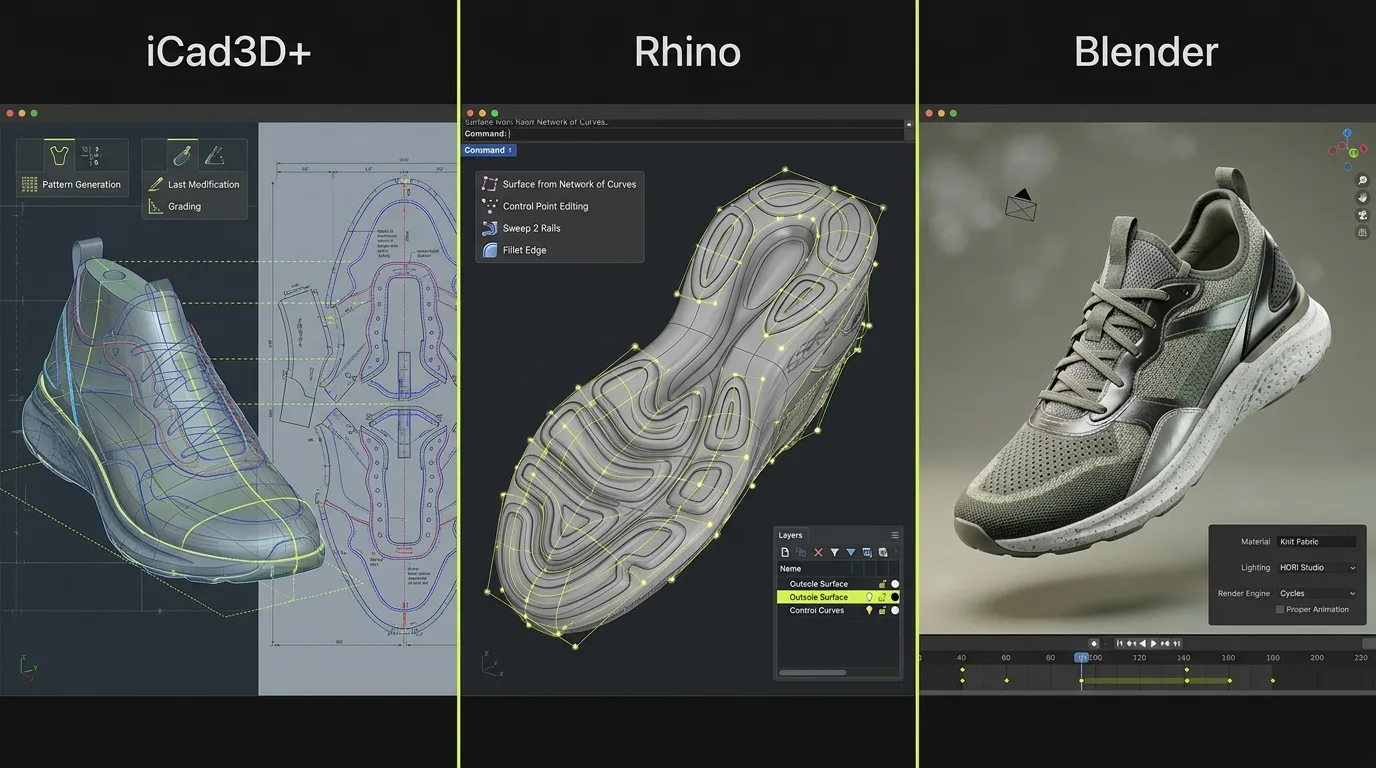
The four tools compared in detail below — Icad Universe, Rhino, CLO3D, and Blender — sit across these three categories. That is why they are not interchangeable, and why the right answer is usually a combination rather than a single pick.
Is Icad Universe the Professional Standard for Footwear CAD?
Icad Universe is the de facto standard for structured leather footwear in European design studios. Developed by INESCOP (Spain), the tool's entire logic mirrors the professional footwear workflow: start from a last, build the upper, generate production-ready 2D patterns. Zara/Tempe operates a team of 50+ shoe designers on it (Arsutoria School), and Deichmann is another confirmed user.
What it does for footwear
The workflow in Icad Universe follows the sequence a technical footwear designer actually uses. You start from a last -- the 3D form that defines the shoe's shape -- build the upper geometry directly on top of it, define construction lines and panels, then generate automatic flattening. That is the conversion from 3D upper surfaces to flat 2D cutting patterns, including the lasting allowance.
Because a shoe upper wraps a doubly-curved, non-developable surface, flattening requires algorithms that account for material stretch, grain direction, and construction logic. Icad Universe has refined these algorithms over decades of industry deployment. The output is not an approximation -- it is a production-ready 2D pattern.
Other features that matter for professional footwear work:
- Color and material variant management on the same 3D model, essential for collection presentations
- Integrated PBR rendering with Maxwell compatibility for commercial-quality imagery without leaving the software
- Component library for hardware (eyelets, buckles, zippers), outsoles, heels, and lasting boards -- all parametric and positionable directly on the model
- Adobe Substance 3D material integration, confirmed by the Adobe Substance 3D plugins page
- Automatic lasting margin generation from the flattened pattern
Strengths
Vertical integration. Everything a footwear designer needs -- from last to pattern -- lives in one environment. No file round-trips, no plugin dependencies, no manual workarounds for tasks that are industry-standard.
Limitations
Icad Universe is purpose-built, which means it is also scope-limited. If your work extends beyond footwear -- bags, accessories, apparel -- you will need complementary tools. The interface carries the marks of decades of specialized development: functional and precise, but not visually modern by the standards of software designed for broad consumer appeal.
The learning curve is specific, not steep. The concepts map directly to physical footwear construction. A structured course compresses that curve significantly -- more on this below.
Who uses it
Icad Universe is the standard in structured leather footwear brands, technical design offices, and professional footwear designers working on dress shoes, boots, loafers, sandals, and classic constructions. It is the tool you find in the Brenta, Vigevano, and Fermo districts in Italy, and widely across Spain, Portugal, and France.
Citation capsule: Icad Universe, developed by INESCOP, is the primary 3D footwear CAD at Zara/Tempe, where a team of 50+ shoe designers use it daily, and at Deichmann. It integrates simultaneous 3D virtual and 2D pattern environments and supports Adobe Substance 3D materials (Arsutoria School).
Does Rhino Work for Shoe Design?
Rhino excels at outsole and midsole modeling, heel construction, and any geometry requiring tight curvature control for mold manufacture or 3D printing. A Rhino 8 commercial single-user perpetual license is priced at $995 USD -- no subscription, no expiry (McNeel / Rhinoceros 3D official buy page). That one-time cost, combined with its depth in parametric design via Grasshopper, makes it a strong complement to a specialized footwear CAD.
What it does for footwear
Rhino excels at outsole and midsole modeling, heel construction, and any geometry that requires tight curvature control for mold manufacture or 3D printing. The Grasshopper visual programming environment enables parametric design logic -- lattice midsole structures, algorithmically-generated outsole patterns, generative tread geometries -- that no other mainstream tool handles as fluidly.
The plugin ecosystem matters here. 3DShoemaker adds footwear-specific tools including basic last management and some flattening capability, bringing Rhino closer to footwear-native territory. FTWkit, Botcha, Jevero, and 3DShoemaker together form a plugin ecosystem that generalist comparison articles miss entirely. None of the current top-ranking results for "best software for shoe design" mention these plugins.
The real footwear use case for Rhino is not as a standalone shoe design tool -- it is as the sole-and-heel engineering environment that runs alongside Icad Universe for the upper. Advanced studios use both: Icad Universe for last-based upper construction and pattern generation, Rhino for the structural sole geometry that goes to the mold maker or 3D printer.
Strengths
Transferable skill: learning Rhino means acquiring a competency used across architecture, product design, jewelry, and automotive. For designers working across categories, that investment pays across multiple contexts. The community is enormous, documentation is extensive, and the plugin library is deep.
Limitations
Rhino was not designed for footwear upper construction. There is no native last-centric workflow, no automatic flattening for upper panels, and no production-pattern generation. The "Squish" command can flatten surfaces, but it is a general-purpose geometric operation -- it does not understand lasting allowances, grain direction, or the construction logic a pattern maker expects.
Who uses it
Industrial designers entering footwear from other sectors. Sole and heel specialists who prototype custom geometry. Advanced design studios that pair Rhino with Icad Universe -- Rhino for structural components, Icad Universe for the upper and pattern. Brands with strong parametric design ambitions, particularly in midsole engineering.
how to model a shoe upper in 3D
Citation capsule: A Rhino 8 commercial perpetual license costs $995 USD (no subscription). Its Grasshopper environment handles parametric midsole and outsole engineering. The footwear plugin ecosystem -- FTWkit, Botcha, 3DShoemaker, Jevero -- extends its scope significantly, though upper pattern generation still requires a dedicated footwear CAD (McNeel, rhino3d.com/buy).
When Should You Choose CLO3D for Footwear?
CLO3D is the right choice when material behavior -- how a textile stretches and folds over a last -- is central to your design process. Nike, Adidas, Hugo Boss, H&M, Zara, Lacoste, Arc'teryx, and Patagonia all confirmed their use of CLO Virtual Fashion software, per CLO's enterprise page and the 2025 CLO Summit Munich press release (PRNewswire, 2025).
What it does for footwear
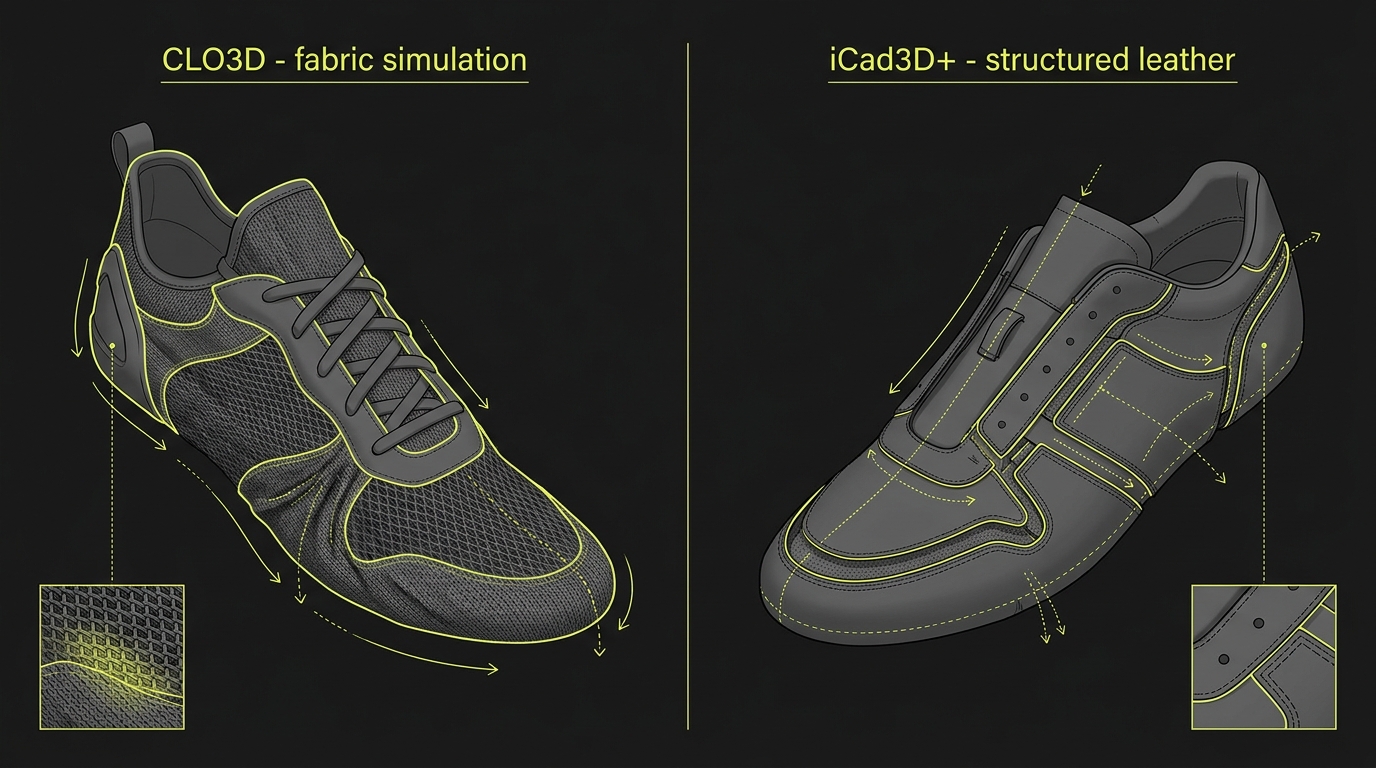
CLO3D's core capability is dynamic fabric simulation. Mesh, knit, woven textiles, technical stretch materials -- all calculated with a physics engine that produces realistic drape, tension, and material behavior. For brands designing uppers in engineered knit, flyknit-style constructions, woven nylon, or stretch mesh, this simulation quality is a genuine competitive advantage: it reduces the number of physical samples needed for material validation.
Research published in Textile World (March 2024) found that 40% of traditional physical samples never advance to production. Digital sampling can cut pre-production sample costs by over 60% (Textile World, March 2024). CLO3D is one of the primary tools delivering that reduction in the sneaker and sportswear segment.
The tool also integrates with enterprise PLM systems, making it viable for large brand workflows where design data needs to flow into product lifecycle management platforms.
Strengths
Material simulation quality. No other mainstream tool comes close for textile behavior. Visual communication of material choices is fast, convincing, and useful for internal review and buyer presentations.
Limitations
CLO3D's construction paradigm is panel-based, inherited from apparel. Structured leather footwear -- with its last-driven construction, lasting margin, insole board, and stiffener logic -- is not what the tool was designed for. You can texture a leather shoe in CLO3D and render it convincingly, but the underlying workflow does not reflect how that shoe is actually built. Flattening in the footwear sense is absent.
GPU requirements for real-time simulation are meaningful. Enterprise licensing costs are significant. For leather and classic construction, it is the wrong tool.
Who uses it
Sneaker brands with a strong textile component. Sportswear design teams working in running, training, and lifestyle. Studios working with technical synthetic materials. Brands where visual material validation at the sample stage is a workflow priority.
Citation capsule: CLO Virtual Fashion's software is used by Nike, Adidas, Hugo Boss, H&M, Zara, Lacoste, Arc'teryx, and Patagonia, confirmed by CLO's enterprise page and the 2025 CLO Summit Munich press release (PRNewswire, 2025). Its fabric simulation engine is most valuable for textile sneaker uppers, not structured leather footwear.
Is Blender Useful for Shoe Design?
Blender is free and open-source, and its 2024 user survey (7,000+ respondents, October 2024) found that 56.75% of users began their 3D journey with Blender (Blender Foundation, survey.blender.org/feedback/2024/). That makes it the most common entry point to 3D. It is not, however, a technical footwear CAD -- and treating it as one is the most common beginner mistake in this space.
What it does for footwear
Blender is a polygonal and sculpting modeler with strong rendering (Cycles, EEVEE), rigging, and animation capabilities. For footwear specifically, it is most useful for:
- Concept visualization: designing a shoe look without production intent
- Hero renders and marketing imagery: creating photorealistic or stylized images for portfolio or campaign use
- Sculpting organic forms: creating reference geometry that gets retopologized or imported into a CAD-native tool
- Substance 3D material preview: Blender integrates well with Substance-painted textures for final render output
Some designers use Blender's Shrinkwrap modifier to drape geometry onto a last reference, approximating an upper. It works in limited cases. It does not produce production-ready patterns, and the workflow is manual and technically demanding.
Strengths
Cost (free). Quality ceiling for rendering. The sculpting environment for organic forms is excellent. As a visualization layer downstream from CAD work in other tools, it is highly capable.
Limitations
No footwear-specific tools. No last management, no construction lines, no flattening, no pattern output. Polygon modeling is fundamentally different from NURBS surface modeling -- the file formats do not translate cleanly to manufacturing. Blender is a renderer and visualizer that can approximate shoes; it is not a shoe design tool in the professional sense.
Who uses it
Concept artists and footwear illustrators. Designers creating portfolio renders or brand campaigns. Teams using Blender as a visualization layer downstream from CAD-based design. Beginners exploring 3D before committing to a specialized tool.
[CHART: Bar chart - "Blender 2024 survey: percentage of users who started their 3D journey with Blender (56.75%) vs. those who used another tool first (~43.25%)" - Source: Blender Foundation, survey.blender.org/feedback/2024/]
Other Tools Worth Knowing
A complete picture of the footwear software landscape includes several tools that rarely appear in generic comparisons. These are the ones we see repeatedly in professional studios.
Shoemaster (iCad) covers the grading and pattern engineering side of footwear manufacturing. Where Icad Universe focuses on 3D design and pattern generation, Shoemaster handles grading across sizes, cut optimization, and technical specification output for factories. In large manufacturing operations, both tools are used together.
Romans CAD is an Italian-developed footwear CAD system with strong roots in the Marche district. Used primarily for 2D pattern making and grading with some 3D capability, it remains common in Italian and Portuguese factories.
Modo (Foundry) is a polygonal and subdivision surface modeler favored in product design and used by several performance footwear brands for concept modeling and rendering. Like Blender, it produces excellent visuals but is not a technical footwear CAD in the pattern-making sense.
Substance 3D Painter (Adobe) is not a shoe design tool but deserves mention as the industry standard for PBR material painting on 3D shoes. Designers take geometry from any of the above tools, import it into Substance, paint leather grain, stitching, rubber texture, and color story, then use those materials in final renders. It slots in downstream of the 3D modeling workflow.
3D sole and heel design techniques
Comparison Table
[CHART: Comparison table rendered as a clean visual graphic for sharing - Icad Universe, Rhino, CLO3D, Blender columns with color-coded cells by capability]
| Icad Universe | Rhino | CLO3D | Blender | |
|---|---|---|---|---|
| Footwear specialization | Native vertical CAD | General NURBS modeler | Textile/sneaker simulation | General 3D / visualizer |
| Last-based workflow | Yes, core feature | Via plugin (3DShoemaker) | No | No |
| Automatic flattening | Yes, production-ready | Approximation (Squish) | No (panel-based) | No |
| 2D pattern output | Yes, with lasting margin | Manual / plugin | No | No |
| Integrated PBR rendering | Yes (+ Maxwell) | Via plugins (V-Ray, etc.) | Yes (good quality) | Yes (Cycles, excellent) |
| Learning curve | Medium (footwear-specific) | High (general, transferable) | Medium (apparel-oriented) | Low entry / high ceiling |
| Industrial use | Leather, structured, classic | Soles, heels, parametric | Sneakers, knit, textile | Concept, renders, portfolio |
| Typical cost | Professional license (on request) | $995 USD perpetual (McNeel) | Annual subscription (enterprise pricing) | Free (blender.org) |
Which Footwear Design Software Should You Choose?
The answer depends on what you are designing, where you are in your career, and what the downstream use of your files is. No single tool covers every scenario -- but the decision tree is simpler than most comparison articles make it look.
Based on our course cohorts and professional studio experience, the most common mistake is not choosing the wrong tool -- it is trying to make one tool do everything. The designers who work fastest use Icad Universe for the upper, Rhino (or a specialist plugin) for the sole, Substance 3D for material finish, and Blender or CLO3D for final presentation. These are complementary layers, not competing choices.
Choose Icad Universe if you design structured leather footwear -- dress shoes, boots, loafers, classic pumps, structured sandals, welted constructions. The vertical workflow eliminates hours of manual work per model compared to any general-purpose alternative. If you are building a career in professional footwear design or want to work in a brand's technical office, Icad Universe is the standard in European footwear manufacturing.
Choose Rhino if your focus is outsole and heel engineering, parametric midsole development, or if you come from product design and already have Rhino fluency. It is also the right complement for designers who use Icad Universe for upper work but need Rhino-quality surface control for sole geometry.
Choose CLO3D if you work on sneakers with knit, mesh, or woven uppers, or if your brand workflow requires visual material validation before physical sampling. It is the right choice when material behavior is central to your design process.
Choose Blender if you are a concept artist, building a portfolio, or need a free rendering environment to visualize designs. Do not choose it if your goal is production-ready technical design. Use it as a downstream visualization layer instead.
Use combinations. Icad Universe for the upper and pattern, Rhino for the sole, Substance 3D for material finish, Blender or CLO3D for final renders. These are not competing tools so much as a layered toolkit, each covering what the others do not.
Susanna Zampieri, official Icad Universe trainer with 10+ years in the footwear industry and 100+ students trained, recommends starting with the tool that matches your primary construction type -- and adding the others only once your core workflow is solid. For most professional footwear designers, that means Icad Universe first.
If you want to learn Icad Universe with a structured curriculum built for professional footwear work, the 3D Footwear Design course covers the full workflow from last to pattern to render.
Choosing Shoe Design Software by Role
The right choice depends on three things: your role in the workflow, your segment (leather vs. textile vs. athletic), and your budget. There is no universally correct answer — but there are clearly wrong choices for specific contexts, and most beginner guides avoid saying that directly.
A useful framing: ask what your final deliverable is. If it is a render for a client presentation, almost any tool works. If it is a flat cutting pattern going to a factory, the answer narrows considerably. If it is graded production files for multiple sizes, only footwear-specialized CAD does that without significant workarounds.
Choosing by Role: Student
Students are often advised to start with free tools, and that advice makes sense financially. Blender provides a strong introduction to 3D spatial thinking at zero cost. Adobe Illustrator skills transfer directly to every professional studio. These are good starting points, not destinations.
The strategic move for a student targeting a professional footwear career is to learn a footwear-specialized tool before graduation. Employers in technical design offices look for Icad Universe or Shoemaster fluency — not Blender skills — when hiring for pattern engineering and product development roles. Starting with the professional tool from day one, even in a simplified mode, builds the right mental model from the start.
Arsutoria School in Milan includes Icad Universe as the primary 3D software in their footwear diploma. Politecnico Calzaturiero in Padua has collaborated with Red21 (Icad Universe's exclusive distributor) since 2008. This reflects what the market rewards.
Choosing by Role: Freelance Designer
Freelance designers face a real cost-versus-capability decision. A Rhino perpetual license at $995 is the most cost-efficient entry into professional 3D, especially for designers focused on sole and heel work, creative concept presentations, or clients in the athletic/streetwear segment. Adding FTWkit extends Rhino into pattern territory for designers who cannot justify a full specialist suite.
For freelancers working on structured leather footwear, the calculation is different. Clients in that segment expect production-ready files. Rhino workarounds add hours to every project. If your client base is leather brands, the investment in a footwear-specialized tool pays back in time saved per commission. We've seen this clearly in our own students who moved from Rhino to Icad Universe after taking on their first leather upper projects: the time savings per model are significant.
Choosing by Role: Brand Development Team
Brand development teams have the clearest decision criteria, because the choice feeds into infrastructure: training, file format standards, supplier capability, PLM integration. The dominant tools in European leather brand development offices are Icad Universe, Shoemaster, and Romans CAD. Sports brands with parametric sole engineering requirements lean on Rhino. Brands with significant knit or woven upper programs add CLO3D.
The key decision is not which single tool to standardize on, but which combination covers the full workflow. Icad Universe for upper construction and pattern engineering, Rhino for sole modeling, Adobe Substance 3D for photorealistic material presentation: that three-tool stack appears repeatedly in studios across Spain, Italy, Portugal, and France. This multi-tool approach is how production-scale teams treat software standardization.
FAQ
What is the best software for shoe design in 2026?
For structured leather footwear, Icad Universe (by iCad) is the professional standard, used by Zara/Tempe with 50+ designers (Arsutoria School). For textile sneakers, CLO3D leads. For sole/heel engineering, Rhino at $995 perpetual (rhino3d.com/buy) is the strongest option. Blender is the right free tool for visualization, not technical production.
Can I use multiple shoe design software tools together?
Yes, and in professional studios this is the norm rather than the exception. The footwear industry's common exchange formats -- .igs (IGES), .stl, .obj -- are supported across Icad Universe, Rhino, CLO3D, and Blender. A typical advanced workflow uses Rhino to engineer a custom sole, Icad Universe for upper construction and flattening, then Blender or CLO3D for final material rendering.
Should I start with Rhino or Icad Universe as a footwear designer?
Start with Icad Universe if your goal is structured footwear design or a career in a brand's technical office. You will learn the workflow logic of the industry from the ground up. If you already have Rhino experience from another discipline, add Icad Universe as your second tool to complete the workflow rather than rebuilding from scratch.
Does CLO3D work for leather shoe design?
In a limited way. CLO3D can render a leather texture convincingly and simulate stiff material behavior to some degree, but its construction logic is fundamentally apparel-panel-based. It lacks last management, construction line tools, lasting margin generation, and the flattening workflow that leather footwear requires. For leather footwear with traditional construction, Icad Universe is the correct tool.
Why does digital sampling matter when choosing footwear design software?
The footwear industry produces roughly 14 billion pairs annually, with an average of 13 physical samples per design -- and 40% of those samples never advance to production (Textile World, March 2024). Digital sampling with the right tool cuts those costs by 60%+ (The Interline, January 2025). Choosing software that supports genuine 3D-to-2D production workflows, not just visualization, is what delivers that saving.
What is shoe design software used for?
Shoe design software covers the full development process: initial concept sketching, 3D upper modeling on a last, 2D pattern engineering, grading across sizes, material and colorway presentation, and export for cutting or 3D printing. Different tools cover different stages. Most professional footwear studios use two or three tools together, each handling what the others cannot.
What is the difference between footwear-specialized CAD and generalist 3D software?
Footwear-specialized CAD — Icad Universe, Shoemaster, Romans CAD — is built around how shoes are physically constructed. The workflow begins with a last, builds the upper geometry in 3D, and automatically flattens that geometry into a production-ready 2D cutting pattern while respecting lasting allowances, grain direction, and seam placement. Generalist 3D tools (Rhino, Blender, CLO3D) do not have those capabilities natively. They require footwear-specific plugins or manual workarounds for pattern output.
How much does shoe design software cost?
Costs vary widely by category. Blender is free. Rhino costs approximately €1,000 for a perpetual license (Arsutoria School, 2025). CLO3D operates on an annual subscription at enterprise pricing. Industry-grade footwear-specialized suites like Icad Universe are quoted per professional licence on request. The cost difference reflects the scope difference: specialized tools are production infrastructure, not desktop software. Some design schools include software access within their program fees.
Which shoe design software should a beginner start with?
The right starting point depends on your goal. For concept sketching and portfolio building, start with Adobe Illustrator and Blender. For a career in leather footwear technical design, start with Icad Universe — preferably through a structured course that teaches the construction logic alongside the software. For sole engineering or a product design background extending into footwear, start with Rhino. The most common mistake is starting with a tool that does not match your intended workflow and building habits that need to be undone later.
Start with the Right Tool
The software decision is less complicated once you map it to your actual workflow. Structured leather footwear: Icad Universe. Textile sneakers: CLO3D. Sole engineering: Rhino. Visualization: Blender or Substance 3D. Most advanced studios use at least two of these in combination.
If this comparison points you toward Icad Universe -- or if you want to understand what working with a vertical footwear CAD actually feels like before committing -- the most direct path is a structured course taught by someone who uses the software professionally every day.
Learn 3D footwear design with Icad Universe - view the course ->